If you have too many meetings and no time to work, stop planning your day from your to-do list and start from your calendar. Look at the gaps that actually exist, fit your most important tasks into them, protect one focus block, and batch meeting follow-ups so they don’t eat the rest. You probably can’t delete every meeting, but you can stop pretending your day has eight free hours.
This guide is for managers, team leads and project managers whose days are mostly meetings, and anyone else whose calendar looks like a game of Tetris.
Why meeting-heavy days kill output
Meetings rarely take only the time on the invite. Each one has a cost on both sides:
- The warm-up. You stop what you’re doing a few minutes early to prepare, find the link or switch context.
- The cool-down. Afterwards, you write notes, reply to the chat thread, and re-load whatever you were doing before.
- The useless gap. Thirty minutes between two calls looks like free time, but it’s rarely long enough to start anything that needs thought.
- The follow-up pile. Every meeting creates small tasks: send the deck, update the ticket, check with finance. They tend to land in your head rather than your list.
The result is a calendar that looks half free but leaves almost no usable time. This is sometimes called calendar fragmentation: your free time exists, but it’s chopped into pieces too small to use well.
Maker vs manager schedules
Paul Graham’s essay Maker’s Schedule, Manager’s Schedule describes the problem neatly. Managers work in hour-long slots, where a meeting is just another block. Makers, such as engineers, writers and designers, need long uninterrupted stretches, where a single meeting in the middle of the afternoon can break the whole thing.
Most people today are both. A project manager runs stand-ups and stakeholder calls, but also writes plans, reviews risks and prepares reports. A team lead attends one-to-ones, then needs to review code or write a strategy document.
The practical takeaway is to accept that you have two kinds of work and to plan for both:
- Manager work fits in small gaps: approvals, quick replies, status updates, short reviews.
- Maker work needs a protected block of at least an hour, ideally longer.
Once you label your tasks this way, scheduling becomes much easier. Small tasks go into small gaps. Big tasks need a real block, and if there isn’t one today, you need to create one or move the task.
Audit your meeting load
Before you plan around your meetings, check whether they all deserve to be there. Take 20 minutes at the end of the week and go through next week’s calendar with these questions:
- Do I need to be here? Could someone else attend, or could I read the notes?
- Does this need to be a meeting? Could it be a written update, a shared doc or a short message?
- Is it the right length? Could a 60-minute meeting be 30, or a 30-minute one be 15?
- Is it in the right place? Could it move next to other meetings so the gaps are bigger?
- Is it still useful? Recurring meetings often outlive their purpose.
You won’t win every battle, but even moving two meetings so they sit back to back can turn two useless 30-minute gaps into one usable hour. If you’re a project manager, a lot of meeting overload stems from wider process issues; our guide to common project management problems and their solutions covers several of them.
Consider a no-meeting block or day
Some teams agree on a no-meeting morning or a full no-meeting day each week. If your team doesn’t, you can still propose one for yourself: block Wednesday mornings, say, and decline meetings that land there unless they’re urgent. Start small. A protected half day is easier to defend than a whole one.
Fit real work into the gaps
This is the core of the method. Instead of writing a to-do list and hoping, plan your work around the meetings you already have.
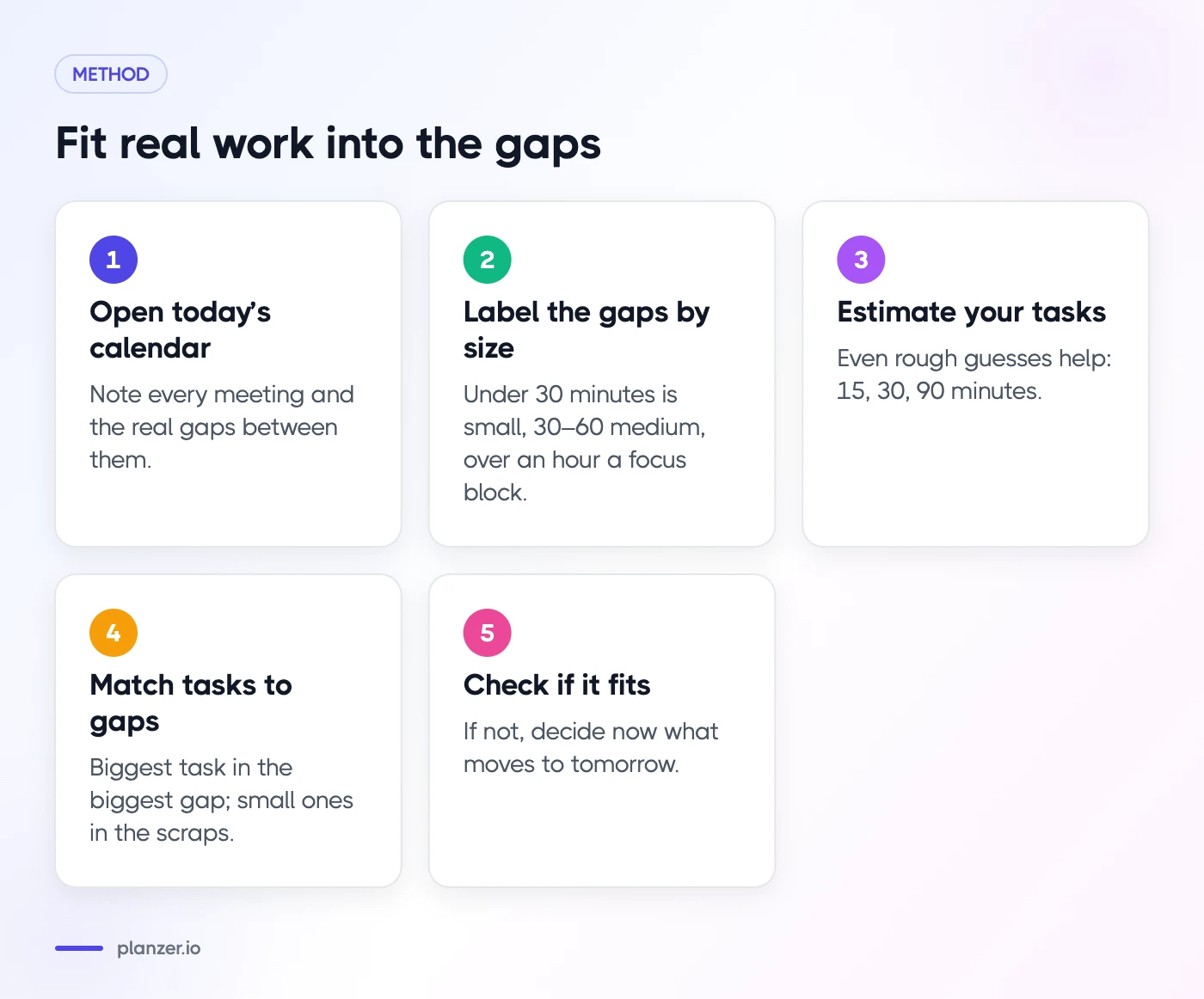
- Open today’s calendar. Note every meeting and the real gaps between them.
- Label the gaps by size. Under 30 minutes is a small gap. 30–60 minutes is a medium gap. Over an hour is a focus block.
- Estimate your tasks. Even rough guesses help: 15 minutes, 30 minutes, 90 minutes.
- Match tasks to gaps. Put your one most important maker task in the biggest gap. Put medium tasks in medium gaps. Save small ones for the scraps between calls.
- Check if it fits. Add up your task estimates and compare them to your free time. If the work doesn’t fit, decide now what moves to tomorrow, rather than discovering at 6 pm that you’re behind.
That last step is where most plans fail. A list of nine tasks feels fine at 9 am, but if you only have three free hours, it was never going to happen. If you need help deciding what to drop, see our guide on how to prioritize tasks when everything feels urgent.
Put tasks on the calendar
When you put a task on your calendar as a time block, two things happen. You can see whether your day is realistic, and other people can see that time is taken. That makes it less likely someone books over your focus block. Our time blocking guide explains the method in more detail.
Protect one focus block a day
On meeting-heavy days, aim for one protected focus block, not a perfect schedule. One 90-minute block a day adds up to more than seven hours of focused work a week, even if the rest of each day is meetings.
Tips for keeping it:
- Book it like a meeting. Give it a clear title, such as “Write Q3 roadmap,” not just “Focus.” Specific blocks are harder to dismiss, for you and for others.
- Put it where your energy is best. For many people that’s the morning, before the meetings begin.
- Set your status. Turn off notifications and set yourself as busy in chat tools.
- Treat moves as reschedules, not cancellations. If a genuine emergency takes the slot, move the block to later in the week straight away.
Batch follow-ups after meetings
Meetings produce a steady trickle of small tasks. If you deal with each one immediately, you’ll spend the whole day context-switching. If you ignore them, they pile up and leak into your evening.
A simple routine:
- During the meeting, capture action items as tasks, not as notes in a doc you’ll never reopen.
- Right after the meeting, take two minutes to estimate each task and decide when it happens.
- Twice a day, run a follow-up batch: one block late morning and one late afternoon where you clear replies, updates and small actions in one go.
The same goes for chat. If a Slack thread turns into a task, move it into your task list instead of leaving it as an unread reminder. Planzer.io’s Slack integration lets you pull messages into your planner so they don’t get lost.
Example: a PM’s meeting-heavy day
Here’s what a planned day might look like for a project manager with five meetings.
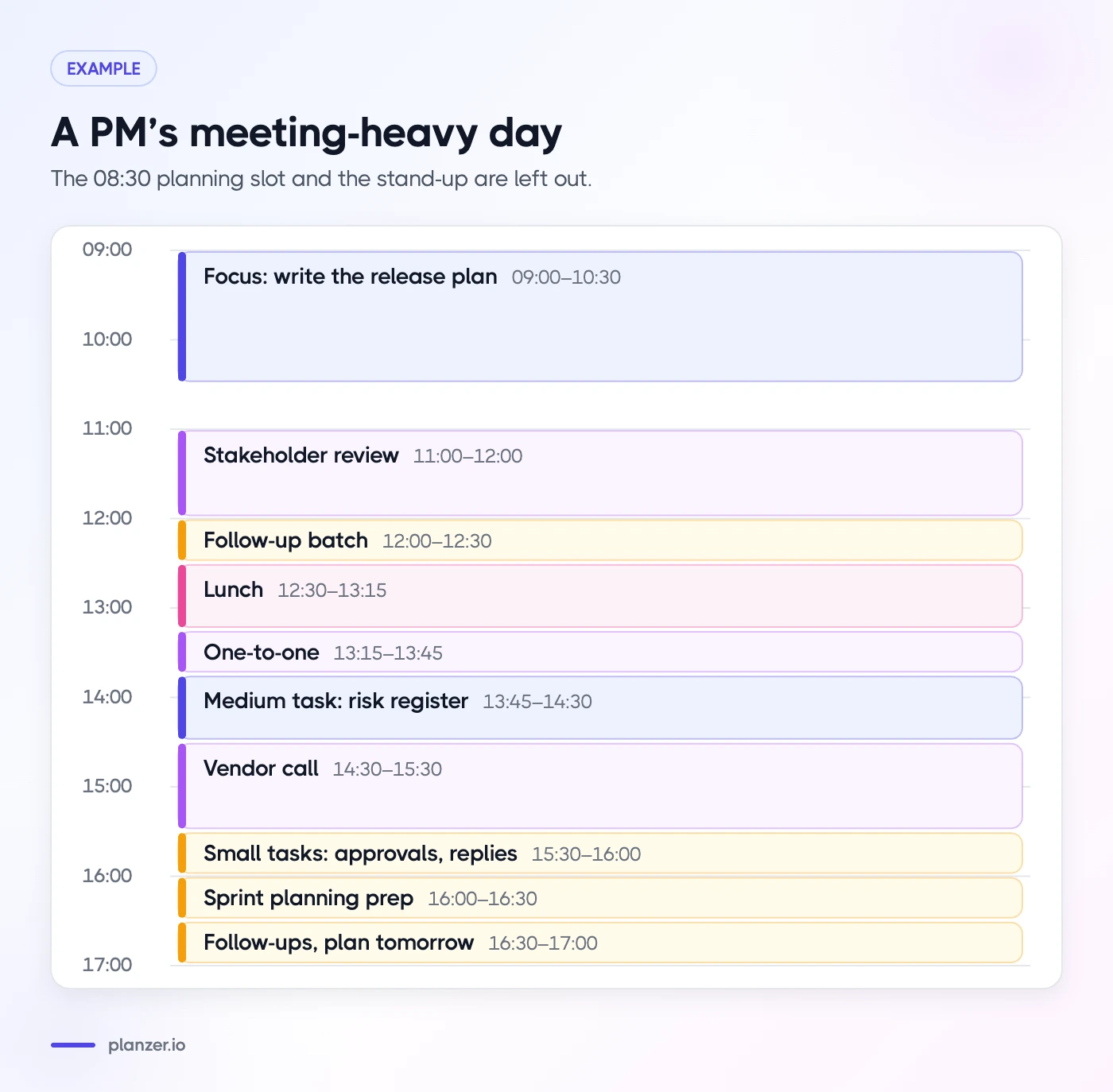
| Time | What |
|---|---|
| 08:30–09:00 | Plan the day and check overnight messages |
| 09:00–10:30 | Focus block: write the release plan |
| 10:30–10:45 | Stand-up |
| 10:45–11:00 | Follow-ups from stand-up |
| 11:00–12:00 | Stakeholder review |
| 12:00–12:30 | Follow-up batch: replies, ticket updates |
| 12:30–13:15 | Lunch |
| 13:15–13:45 | One-to-one |
| 13:45–14:30 | Medium task: review the risk register |
| 14:30–15:30 | Vendor call |
| 15:30–16:00 | Small tasks: approvals and quick replies |
| 16:00–16:30 | Sprint planning prep |
| 16:30–17:00 | Follow-up batch and plan tomorrow |
Notice what’s not on the list: eight other tasks that didn’t fit and were moved to later in the week on purpose. That’s the point. You can see more about how Planzer.io supports this way of working on the page for project managers.
How to do this in Planzer.io
Planzer.io is built around starting from your calendar:
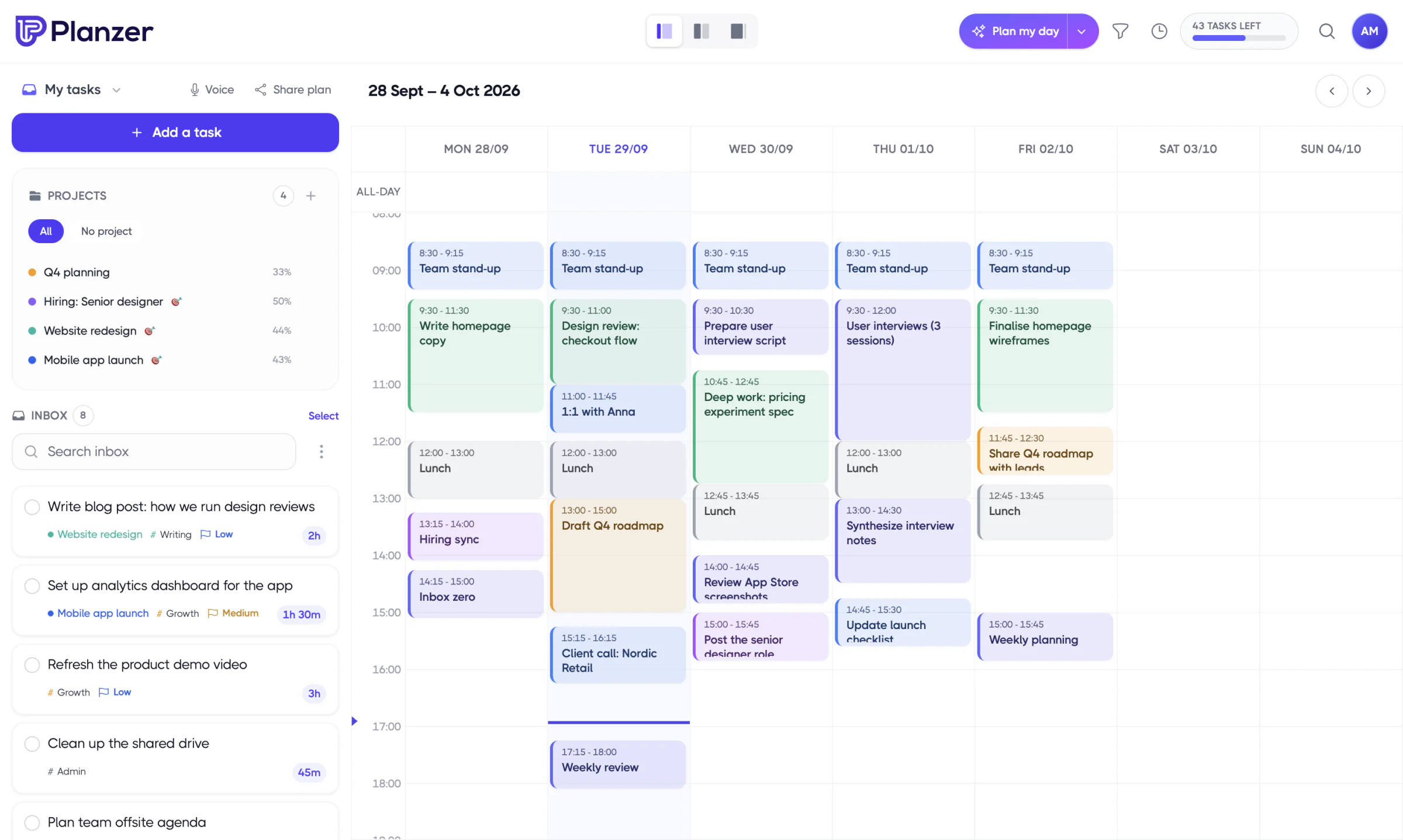
- Plan my day walks you through picking tasks and then scheduling them. “Plan it for me” fits your tasks into free slots between meetings within 09:00–18:00, or you can keep them as a list.
- Running order shows when each task would start and end if you work down the list, working around your meetings, plus a “Done around …” time that turns amber if your work spills past your shutdown time.
- Drag to calendar. Drag any task onto Google Calendar, Outlook Calendar or iCloud Calendar to create a real event. Resize it and the estimate updates.
- Integrations sidebar. Items from Slack, Outlook Mail, Jira, Asana and other tools show in a sidebar so you can drag follow-ups straight into your day.
The free plan includes all integrations, so you can try the full workflow before deciding anything.
FAQ
How do I get work done with back-to-back meetings?
Plan from your calendar, not your list. Match small tasks to short gaps, protect at least one longer focus block, and batch follow-ups twice a day. Then cut or move meetings where you can, especially recurring ones that have lost their purpose.
How many meetings a day is too many?
There’s no universal number. A better test is whether you have at least one usable focus block a day and whether follow-ups are piling up. If you can’t find an hour for your most important work most days, your meeting load is too high for your role.
Should I block focus time on my calendar?
Yes, if your calendar is visible to others. A named block, like “Draft budget proposal,” signals that the time is taken and reminds you what to do with it. Treat it like a meeting with yourself and reschedule it rather than deleting it when something urgent comes up.