The planning fallacy is the tendency to underestimate how long a task will take, even when you know similar tasks have run late before. The fix isn’t to try harder at guessing. It’s to track your estimates against actual time for a couple of weeks, find your personal multiplier, and plan with buffers based on what really happens rather than what you hope will happen.
This post explains where the idea comes from, why almost everyone falls for it, and a step-by-step way to make your estimates more accurate.
What the planning fallacy is
The term was introduced by psychologists Daniel Kahneman and Amos Tversky in 1979. It describes a specific pattern: when we predict how long our own task will take, we focus on the best-case path and ignore how long similar tasks took in the past. Later work by Lovallo and Kahneman broadened it to costs and risks too.
The key detail is that it happens even when we know better. You might remember that your last three reports each took a full day, and still plan this one for two hours.
A well-known study by Roger Buehler and colleagues asked students to predict when they’d finish their theses. According to the Wikipedia summary of the planning fallacy, the average prediction was about 34 days, while the actual average was about 56. Only around 30% finished within their own estimate.
There’s a famous, half-joking version of this too. Hofstadter’s law, from Douglas Hofstadter’s 1979 book Gödel, Escher, Bach, says things always take longer than you expect, even when you account for Hofstadter’s law.
Why we underestimate (and why experts do too)
Several things push estimates in the optimistic direction:
- We imagine the ideal path. We picture the task going smoothly from start to finish, without interruptions, unclear requirements or a slow laptop.
- We plan the task, not the work around it. Setting up, finding files, waiting for feedback and switching context rarely make it into an estimate.
- We treat each task as unique. “This one is different” lets us ignore past evidence.
- We want it to be quick. Wishful thinking is hard to separate from forecasting, especially when we’re under pressure.
- We estimate the big chunk, not the parts. “Build the feature” hides a dozen subtasks, each with its own surprises.
Experience doesn’t cure it on its own. Experts know the domain better, but they’re still estimating from the inside view: their own plan and their own optimism. What helps is the outside view, looking at how long similar tasks actually took. That’s the idea behind a method called reference class forecasting, and you can use a simple version of it on your own work.
The cost: overpacked days and missed deadlines
At the scale of one task, a bad estimate is a small annoyance. Across a day it adds up fast.
Say you plan six tasks and each one runs 30% over. A plan that “ends” at 16:00 really ends after 18:00. You either work late, rush the last tasks or push them to tomorrow, where they collide with tomorrow’s equally optimistic plan.
Over time that creates:
- Chronic overload. Your to-do list never empties, so it always feels like you’re behind.
- Missed deadlines. Small slips compound into late projects.
- Lost trust in planning. When plans never match reality, it’s tempting to stop planning altogether.
- Late evenings. The day’s real finish time drifts later and later.
The planning fallacy isn’t a character flaw. It’s a predictable bias, which means you can correct for it.
How to estimate tasks more accurately
Before you start tracking, a few habits will improve your estimates straight away:
- Break big tasks down. Estimate the parts, then add them up. Splitting work into subtasks tends to surface steps you’d forget.
- Ask “what usually goes wrong?” Waiting on feedback, unclear scope, a meeting that runs over. Add time for it.
- Compare with a past example. “Last time I wrote a proposal like this, it took about four hours.” That’s your outside view.
- Estimate in ranges first. “Between one and three hours” is more honest than “two hours”. Plan with the upper half of the range.
- Include setup and wrap-up. Opening files, getting into the task, sending it off.
If you want a quick sanity check, try our task time calculator.
Example: estimating a client proposal
Your gut says “two hours”. Break it down instead:
- Reread the brief and notes: 15 minutes
- Outline the sections: 20 minutes
- Write the draft: 75 minutes
- Pricing and timeline: 30 minutes
- Proofread and format: 20 minutes
- Send it and update the client record: 10 minutes
That’s close to three hours before anything goes wrong. Now ask what usually goes wrong: the client’s notes are scattered across email, or you need a colleague to confirm a price. Planning three and a half hours is honest. Planning two guarantees a late afternoon.
Track estimate vs actual for two weeks
The best cure for the planning fallacy is your own data. For two weeks:
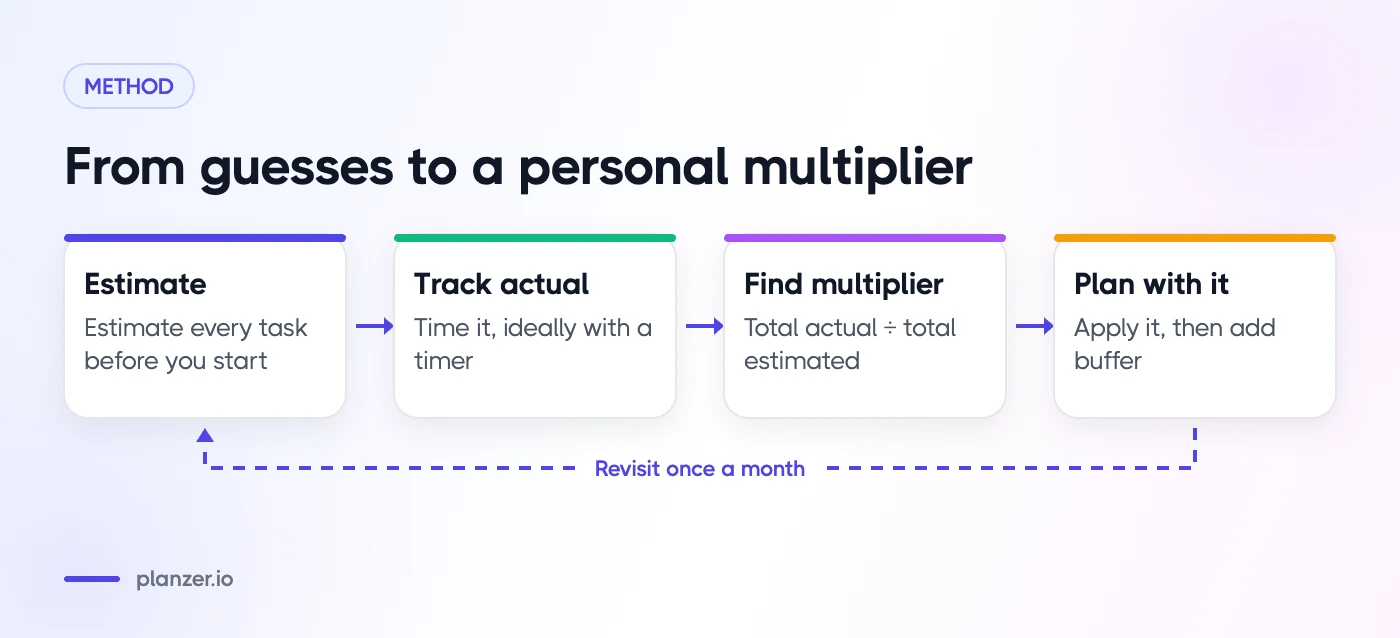
- Estimate every task before you start. Even roughly.
- Track how long it actually took. A timer is easiest. A time tracking tool that stores both numbers next to each other is even better.
- Tag tasks by type. For example: writing, meetings prep, coding, admin, email, design.
- Note why big misses happened. Interrupted, unclear brief, underestimated scope, waiting on someone.
You don’t need perfect discipline. Even tracking most of your tasks for two weeks gives you enough to spot patterns.
What you’ll probably find
Most people discover that some task types are estimated quite well and others are consistently off. Admin might be accurate, while writing or anything involving other people runs much longer. That’s useful: you now know where to add time, instead of padding everything equally.
Find your personal multiplier
Once you have two weeks of data, work out a multiplier for each task type.
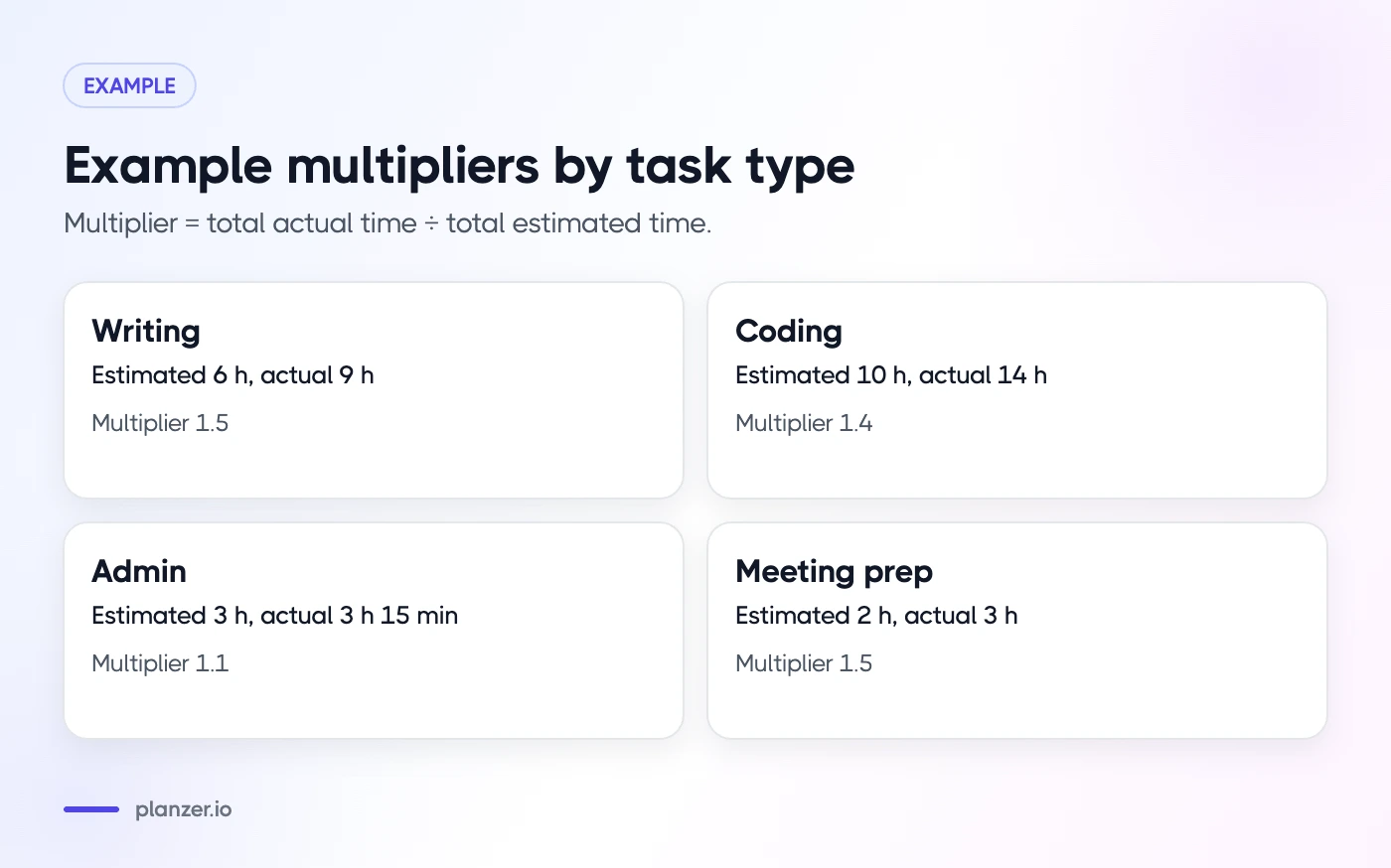
Multiplier = total actual time ÷ total estimated time
| Task type | Estimated | Actual | Multiplier |
|---|---|---|---|
| Writing | 6 h | 9 h | 1.5 |
| Coding | 10 h | 14 h | 1.4 |
| Admin | 3 h | 3 h 15 min | 1.1 |
| Meeting prep | 2 h | 3 h | 1.5 |
(These are example numbers. Yours will be different.)
From then on, estimate as normal and then apply the multiplier. If you’d guess two hours for a writing task and your writing multiplier is 1.5, plan three hours.
Revisit your multipliers once a month. As your estimates improve, they’ll creep closer to 1.0. The productivity analytics in a good planner can show this trend without a spreadsheet, and a weekly look back fits naturally into your weekly review.
Build buffers into your plan
Even with good multipliers, some days will surprise you. Buffers absorb the surprises so they don’t wreck the rest of the plan.
- Leave unplanned time every day. An hour is a reasonable starting point; more if your job involves lots of interruptions.
- Add buffer after risky tasks, like first drafts, new types of work or anything that depends on someone else.
- Don’t schedule back-to-back. A 10–15 minute gap between blocks lets you wrap up and reset.
- Check your finish time before you commit. Add up your estimates and meetings. If the plan ends after your normal stopping time, cut something now.
- Have a “drop first” list. Decide in advance which tasks move to tomorrow if the day runs long.
Buffers can feel like wasted time. In practice, they’re what make the rest of your plan believable.
When the planning fallacy meets time blindness
If you find it hard to sense time passing at all, estimation gets even trickier. Our post on time blindness covers ways to make time more visible during the day.
How to do this in Planzer.io
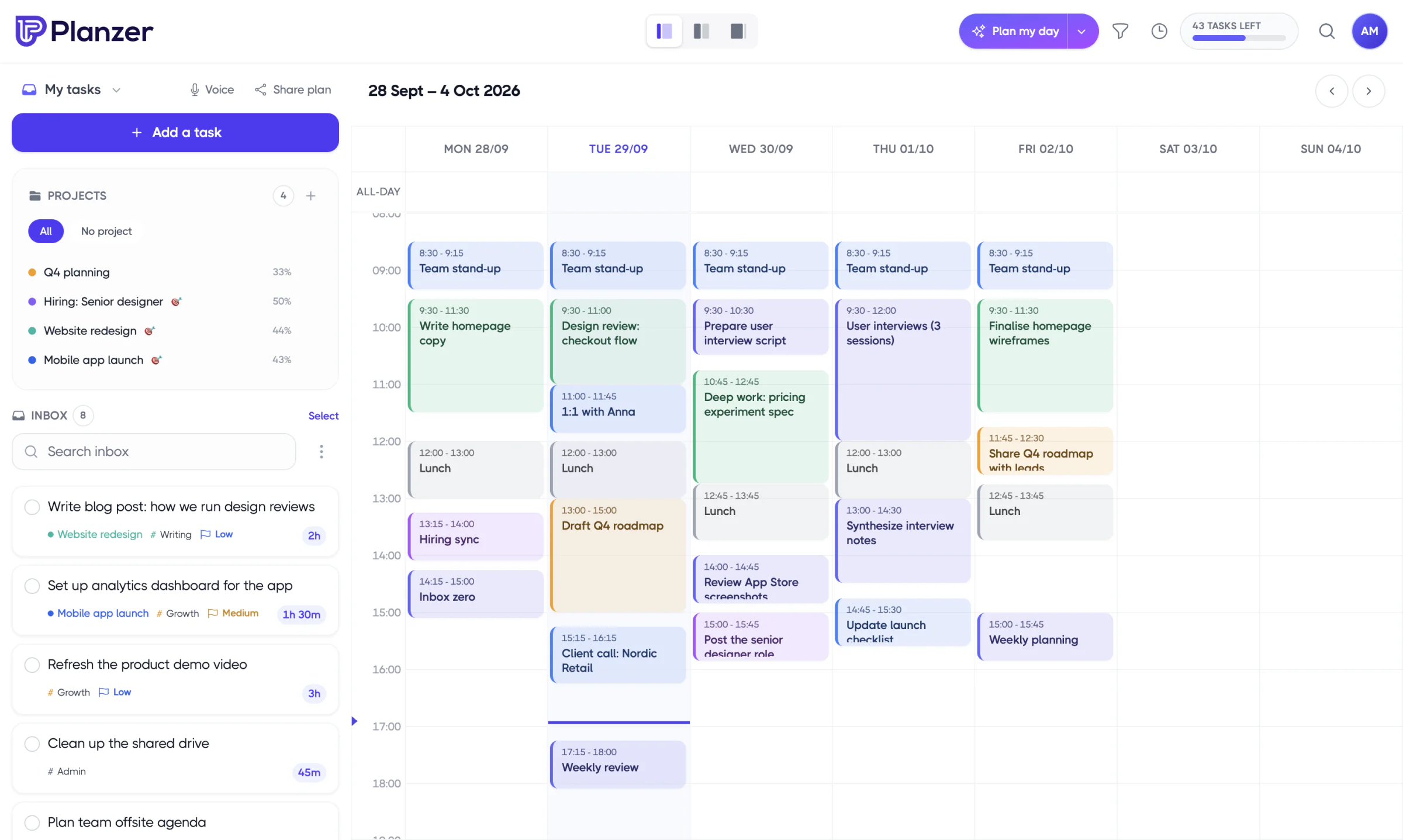
Planzer.io stores an estimate and actual time on every task, and the “Estimated vs actual” analytics show where your guesses miss. When you time block a task on your calendar, resizing the block updates the estimate. Today’s list shows a running order with a “Done around …” finish time that turns amber when your plan runs past your shutdown time, so you can trim the day before it starts. The daily planning flow brings these together each morning.
FAQ
Who coined the planning fallacy?
Psychologists Daniel Kahneman and Amos Tversky introduced the term in 1979. Kahneman later wrote about it in his book Thinking, Fast and Slow.
How do I get better at estimating time?
Track your estimates against actual time for two weeks, group tasks by type and calculate a multiplier for each. Break big tasks into parts and compare new tasks with similar ones you’ve done before.
Should I add buffer time to every task?
Not equally. Add more to task types you consistently underestimate and to anything that depends on other people. Also keep some unplanned time in the day, rather than padding every single task.
What is a good estimate accuracy?
There’s no universal standard. A practical goal is for your multipliers to sit close to 1.0 for routine work, and for your planned finish time to match your real finish time on most days.