
Most of us have a to-do list that is always long and growing. The weekly planning habit is the most important habit to form to stay on top of things. It helps you prioritize tasks, schedule time for important tasks, and reflect on the week to determine if things are going well.
This blog post will cover creating a weekly planning habit that works for you. We’ll also cover the weekly planning benefits and how to make it work for you.
What is a weekly plan?
A weekly plan is a great way to get organized and stay focused. A weekly plan includes specific tasks and goals that you can measure and track, which helps to keep you on track and achieve your goals. A weekly plan is easy to follow and can be customized to fit your needs. A weekly plan includes themes or topics for the week, which helps to keep things organized and focused.
A weekly plan includes a schedule of the days of the week, which helps you to schedule your time effectively and make the most of each day. A weekly plan provides a structure for your day-to-day activities, which helps to keep you on track and in the habit of performing the same task each week or month. A weekly plan is a great way to stay on top of your schedule and priorities.
By following a weekly plan, you can ensure that you are working on completing important tasks and goals within a reasonable timeframe.
What are the benefits of creating a weekly plan?
A weekly plan is a valuable tool to help you stay on track and motivated. A weekly plan helps you establish goals and targets for the week, which helps you stay focused and motivated to reach those targets. A weekly plan also helps you track your progress and make adjustments as needed.
This way, you can stay on track and reach your goals with ease. A weekly plan creates a structure for your day that is easy to follow. This makes planning and tracking your tasks much easier. A weekly plan also helps you achieve your long-term goals more effectively and efficiently.
By following a weekly schedule, you’ll be able to set realistic goals and targets to work towards in a consistent manner. A weekly plan creates a clear schedule of tasks that allows you to focus on the important things of the day.
It also creates the right amount of structure that allows you to easily focus on the tasks at hand, which is important for achieving success in life.
How to make a weekly plan work for you?
A weekly plan can be a great way to help you stay on track and reach your goals. When creating a weekly plan, it’s important to include the tasks you need to complete each week.
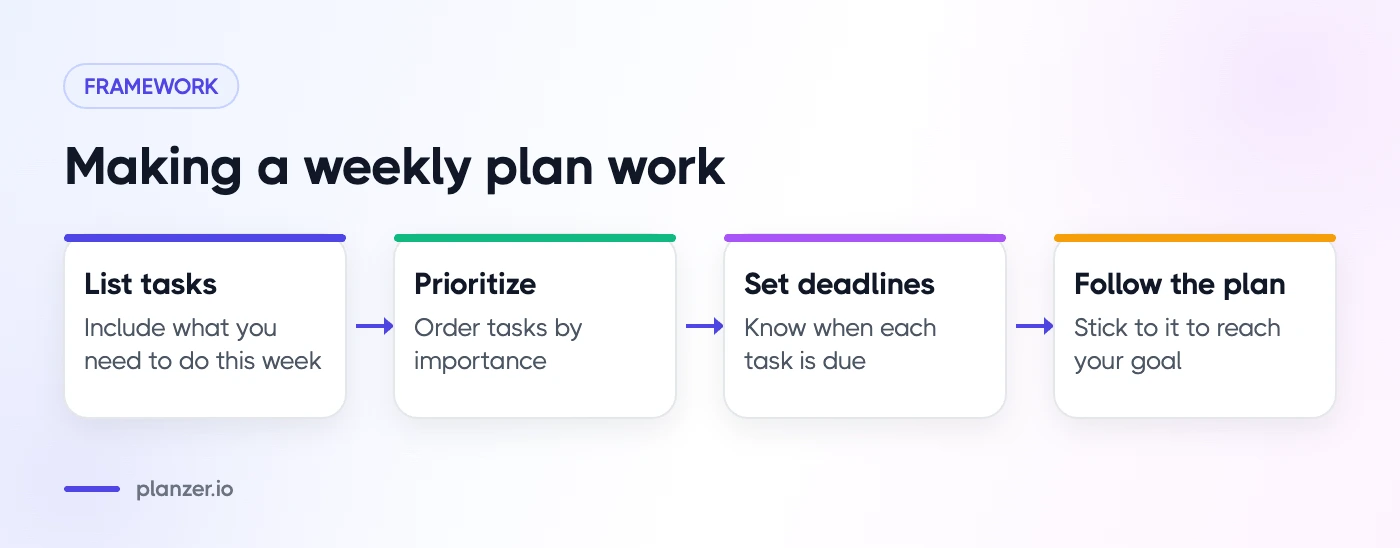
This helps to give you a sense of accomplishment and keeps you motivated to keep on track with your goals. Also, it’s important to prioritize the tasks in order of importance. This will help you determine which tasks are most important to complete and will ensure that nothing is left undone.
Lastly, set deadlines for each task so that you know when it needs to be completed. By following the plan religiously, you’ll be more likely to complete your goal as planned.
How to create your weekly plan
Start by creating a mission or goal for the week. Prioritize your tasks according to their importance to your overall goal. Set deadlines for each task and ensure all tasks are completed on time.
Track your progress and make necessary adjustments as needed. Enjoy the fruits of your labor! This way, you can create a weekly plan that works for you and helps you reach your goals faster and more efficiently.
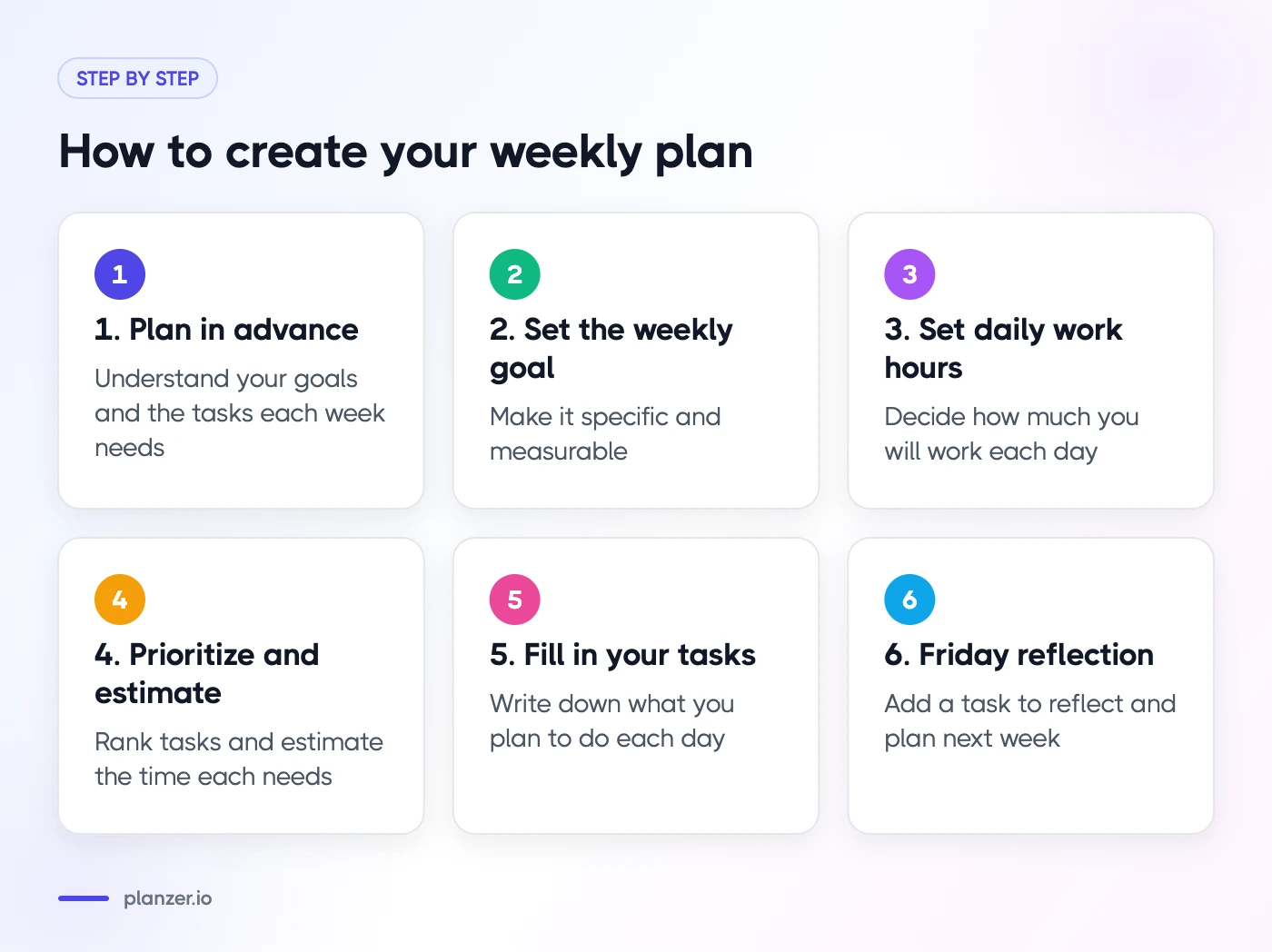
Step 1: Plan in advance
It is important to have a basic understanding of your goals before you can create a weekly plan. Identifying the tasks that need to be completed each week is crucial to achieving your goals.
After completing this step, you can begin to create specific goals for each day of the week. Assigning a time limit to each task and tracking your progress using a calendar or planner are important ways to ensure that you stay on track with your goal of completing all of your tasks each week.
If you plan ahead, weekly tasks will become easier to accomplish and more likely to succeed.
Step 2: Set the goal for the week
To create a weekly plan, you first need to set a goal for the week. This goal should be specific and measurable, reflecting what you want to achieve in the week.
For example, “Send the first draft of the client proposal by Thursday” is a better weekly goal than “finish 10 tasks”, because it tells you which tasks matter most. Once you have set your goal, decide what tasks need to be completed in order to reach that goal.
Each task should be actionable and in line with your goal to ensure it is completed successfully. Finally, schedule time each day to complete those tasks.
By planning ahead and scheduling time each day to complete tasks, you can ensure that your week runs smoothly and that you achieve your goals.
Step 3: Determine how much you will work each day
Next, decide how much you will work each day. It’s important to identify the amount of time you plan to spend working each day so that you can create a weekly plan based on that information.
For example, some people work a full eight-hour day, while others may only work four or five hours. Once you have determined your daily working hours, it is time to create a weekly plan based on that information.
A weekly plan should include specific goals and milestones you want to achieve throughout the week. This helps you stay on track and achieve your objectives.
By creating a weekly schedule and planning your time, you can ensure that you work efficiently and effectively without getting overwhelmed.
Step 4: Prioritize and estimate your tasks
To create a successful weekly plan, it’s important to prioritize tasks and estimate the time required for each task. This helps you determine the most critical tasks to focus on each week. It also allows you to create a realistic schedule for completing your goals.
If a task takes longer than initially estimated, you can make adjustments to your weekly plan to address this change in requirements. If you find that a task is taking longer than expected, it could mean that you are not scheduling tasks efficiently or that there is a better way to accomplish the task.
To solve this problem, it’s crucial to analyze the tasks required to accomplish your goals and figure out how to streamline the process of completing them.
Step 5: Fill in your tasks in your weekly plan
To effectively fill in tasks in your weekly plan, it is essential to write down what you plan to do each day. This can help you stay on track and prioritize your tasks.
Another critical step is to list the tasks you need to complete. This will help you stay organized and prioritize your work. For large tasks, break them down into smaller ones to make them easier to achieve. It’s best to set deadlines for each task so that you know when they are due.
By filling in tasks in your weekly planning schedule, you can be more productive and achieve your goals faster.
Step 6: Add a task for Friday where you reflect and plan for the next week
In step 6 of the weekly planner, you add a task on Friday to reflect on and plan for the next week. This task should be based on what you’re working on and what you want to achieve. A simple weekly review template keeps it short and focused.
For example, if you worked on a project over the past week, you could include tasks to wrap up the project and prepare for next week’s activities.
Your goal should be in your mind as you create your weekly plan. By reflecting on the past week and planning for the next, you can ensure that you are accomplishing your goals and achieving success in your work. This step is essential if you want to achieve your goals and achieve success in your work.
Weekly planning tools
A weekly planning template can be a valuable tool to help you stay organized and on track for the week. When creating a weekly planning template, it’s important to include the objectives of each week, key dates, and deadlines.
This will help you track your schedule and stay focused on important tasks. Another way to create a weekly planning template is to use a stopwatch or timer to track how long it takes you to complete each task.
This can help you identify areas for improvement and better plan your time. Plus, it’s essential to review your weekly plan regularly to ensure it is still relevant and practical.
By implementing these simple steps into your weekly planning routine, you can enjoy more productive weeks and feel more confident in your work-related goals.
Planzer.io
Planzer.io is a daily planner that brings your tasks, calendar and time tracking together in one place. It works in the browser, on iPhone, iPad, Apple Watch and Android, and as a desktop app for Mac, Windows and Linux, with live sync across devices and an offline mode. The free plan covers 100 tasks and all integrations. Pro is $10/month, or $8/month billed yearly, and adds unlimited tasks, AI features and file attachments. Prices checked in October 2026.
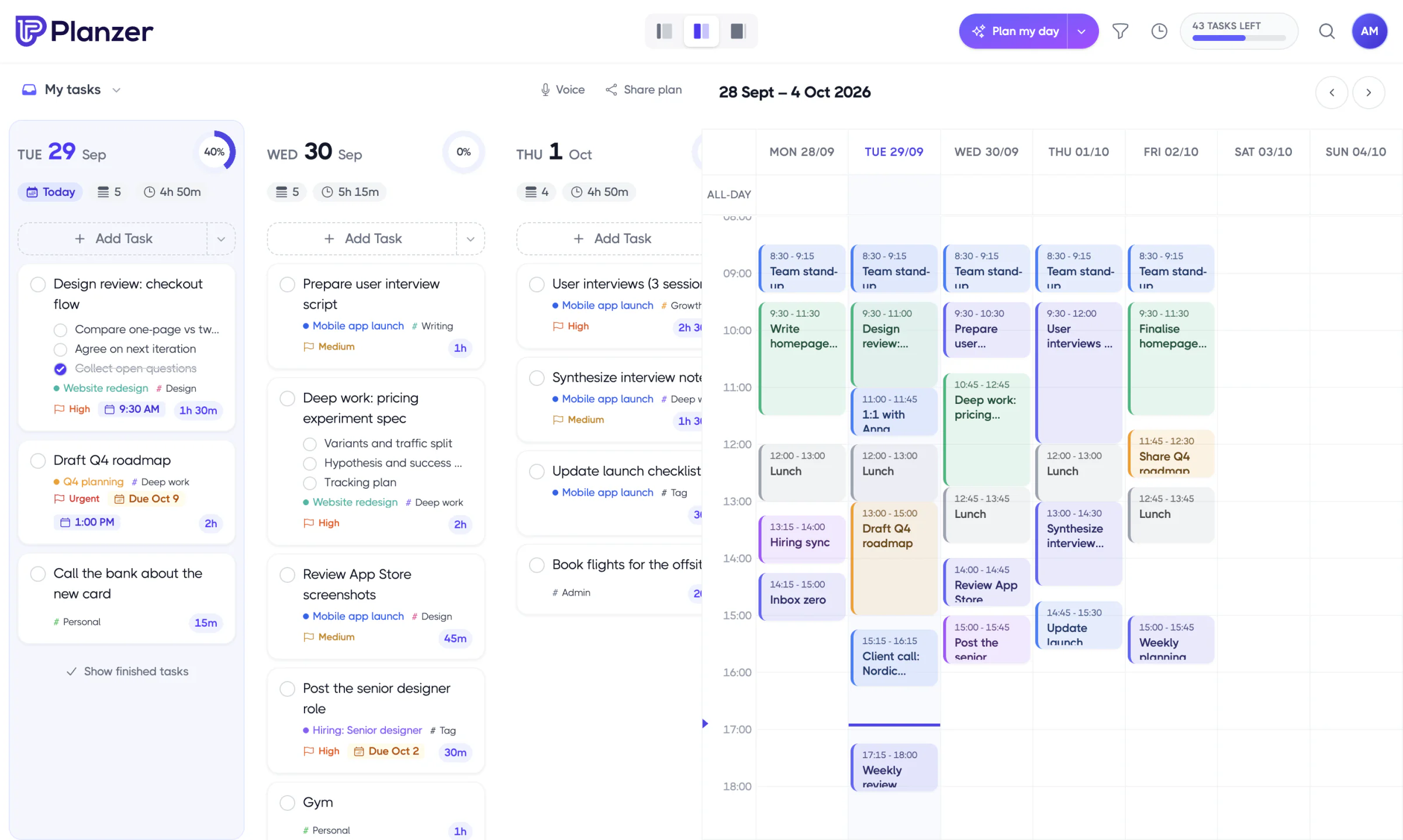
For weekly planning, Planzer.io has “Plan my week” and “Review my week”, so you can set your priorities for the week ahead and look back on what got done. Each morning, Plan my day walks you through today’s tasks, overdue work and meetings, and you can drag tasks into Google Calendar, Outlook Calendar or iCloud Calendar to block time for them. Anything you don’t finish rolls over to today automatically overnight, and you can share a read-only link to today’s plan, or post it to a Slack channel, so others know what you’re working on.
You can group tasks into projects with milestones, link projects to goals and watch their progress add up automatically, and compare estimated vs actual time to see how long things really take, which makes next week’s plan more realistic.
If your tasks already live in Trello, Asana or Monday.com, you don’t have to move them. Planzer.io connects with 16 tools, including the three below, so you can pull their tasks straight into your week.
Trello
Trello is a visual task management tool that can help you stay organized and prioritize your tasks. It offers a variety of features to make planning and tracking your tasks easier, including the ability to create multiple lists, checklists, and individual cards for each task.

Trello works in the browser and has desktop and mobile apps, so you can access your boards from the office, home, or anywhere in between. Newer additions include an Inbox for capturing to-dos from email and Slack, and a Planner that syncs with your calendar so you can block time for your cards.
Trello allows you to easily organize your time and priorities by categorizing tasks into projects and activities. This makes it easier to see what needs to be done and when, which can help you stay productive and on schedule.
Asana
Asana is a cloud-based task management and planning software that offers a variety of features to help you manage your time and tasks more effectively. It can be used to create a weekly plan, track progress on your work, and stay organized.
Asana can be accessed in the browser and on mobile, making it ideal for working from the office or from home. It allows you to organize your work into projects and tasks, which can help you prioritize and focus your efforts.
You can also attach files such as documents and presentations to tasks, so everything you need is in one place.

It has various built-in features that simplify the task of managing your time and tasks, including an app for mobile devices to access the software from anywhere.
Asana is easy to use and allows quick and easy access to all of your tasks in one place. Whether you are working in the office or at home, Asana will help you stay productive both inside and outside the office walls.
Monday.com
Monday.com is a work management platform that provides users with a variety of tools to help them organize their week. Its boards and calendar view allow users to schedule their activities for the week in advance.
The website also includes a to-do list, which can be used to track tasks and prioritize work during the week.
Other valuable features of Monday.com include a calendar to plan each day of the week and a mobile app that allows users to access the planner from anywhere.

The planning features of Monday.com are beneficial for people who have busy schedules and need to plan their day.
Using boards and the calendar view, users can schedule their daily tasks and stay organized throughout the week. Additionally, the mobile app allows users to access the planner from anywhere and quickly see their schedule for the day.
Overall, Monday.com suits teams that want one shared place to plan and track the week’s work.
Conclusion
When you plan your tasks weekly, the planning process becomes a habit—which means it will happen automatically.
Also, creating weekly plans saves time and effort because you no longer have to think about how to get things done. Weekly planning is the best way to ensure the week goes as planned and you achieve your goals. Not sure whether to plan day by day or week by week? Read should I plan my day or my week?
So, next time you plan your week, try it in Planzer.io. The free plan covers 100 tasks and all integrations, which is plenty to build your first weekly plans, and you don’t need a credit card to sign up.